Coruro — your Git repos as a readable board.
Your local Git repos as a readable Kanban board.
- No account
- No cloud — AI runs on your Mac
- No API keys
- MIT
- Open source
Scans a local folder, reads every repo, and shows each as a card — on-device AI, no upload, no account.
Coruro is an open-source macOS app that scans a local folder of Git repositories and shows each one as a card on a five-column Kanban board. On-device AI summaries, via Apple FoundationModels, describe each repo without uploading your code or needing an API key.
Each card shows what the project is, what it's built in, whether it's in sync, and how alive it is — without opening anything. The AI summaries run locally, so your code never leaves the machine. Clone the repo and run your own build — no signed installer, no store, no account.
A folder of repos is a graveyard.
Local clones, half-finished side projects, client work, things I starred and forgot. Names like app-final-2 tell me nothing, and opening each one to remember what it was is its own afternoon.
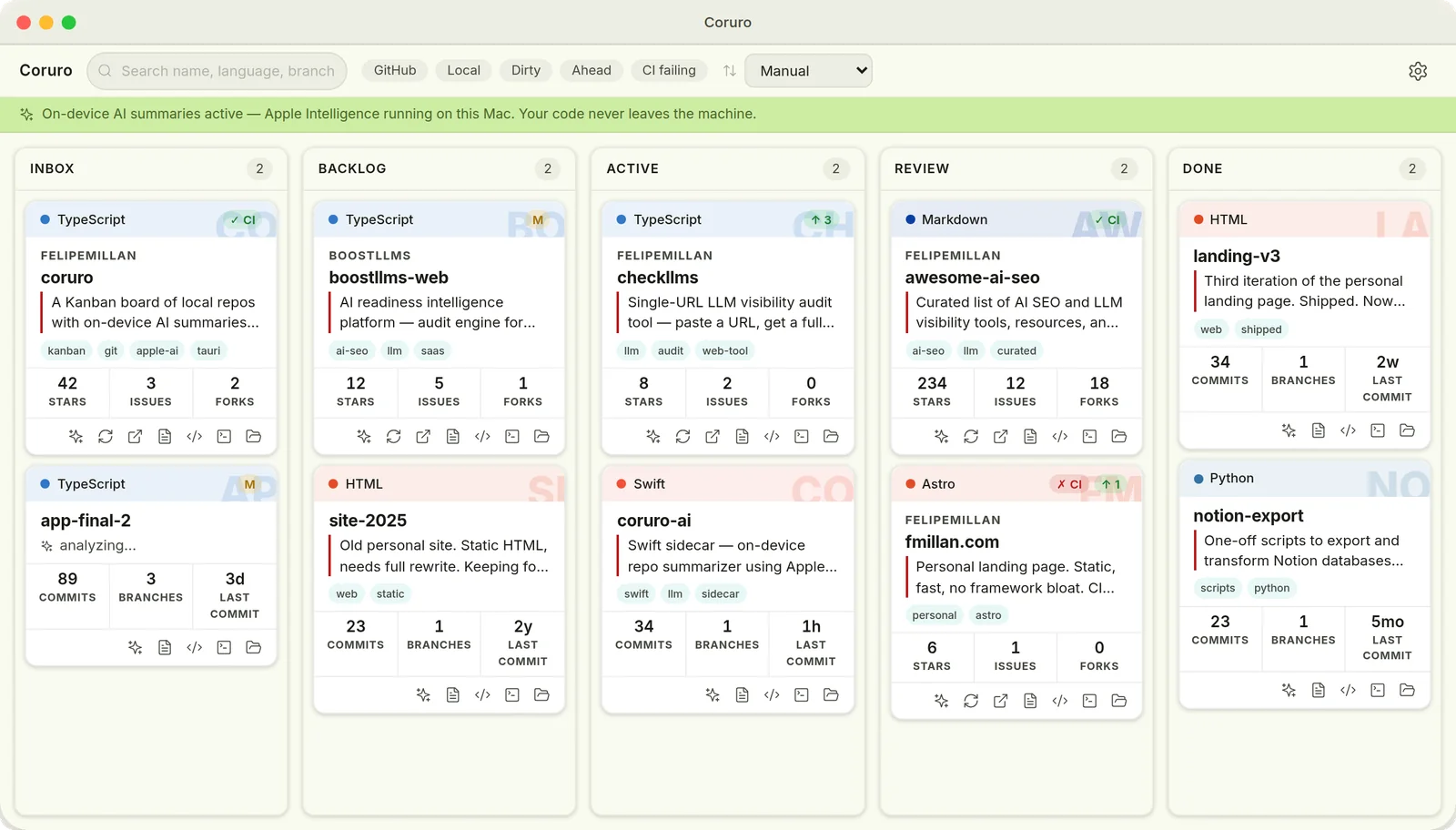
Coruro scans a root folder, finds every Git repo, and draws each as a card on a five-column board — Inbox · Backlog · Active · Review · Done. Drag a repo to where it lives. The card carries the rest.
Each card reads like a project's vital signs: what it is, what it's built in, whether it's in sync, and how alive it is — at a glance, without opening anything.
Vital signs, at a glance.
Each card adapts to what the repo is — GitHub repos get different stats than local-only ones.
What it is
A one-line AI summary and a few topic tags, generated on-device by Apple FoundationModels. No network call, no API key.
What it's built in
A language-tinted header so the stack registers before you read a word. Rust gets one color, TypeScript another.
Whether it's in sync
Current branch, dirty / ahead / behind, and CI status — all read-only. Coruro never touches your working tree.
How alive it is
GitHub repos show stars, issues, and forks. Local-only repos show commits, branches, and last-commit age. The grid decides which.
Six features, one board.
Editorial repo cards
Information density, not decoration White card, soft shadow, language-tint header GitHub repos: stars, issues, forks Local-only repos: commits, branches, last-commit age Card decides which stat grid to show
On-device AI summaries
Apple FoundationModels, no network One-line description and topic tags per repo Runs automatically after a scan Content-hash cached — runs once per change Works without summaries on unsupported Macs — cards still show all Git data Requires Apple Silicon + macOS 26 + Apple Intelligence. Without it, the app still works fully.
Local Git status
Read-only, always current Current branch, clean or dirty Ahead / behind upstream Never touches your working tree No git commands that modify state
GitHub enrichment
Stars, issues, CI — cached locally Stars, forks, open issues, PRs CI status and latest release Topics and license Token lives in macOS Keychain, never on disk Optional. Without a token you still get local Git status and AI summaries.
Kanban workflow
Inbox · Backlog · Active · Review · Done Drag repos between columns Per-repo notes timeline State stored in one JSON file alongside the repo Quick-open in editor, terminal, Finder, or GitHub
Quick actions
One click to context-switch Open in your editor Open in terminal Reveal in Finder Open on GitHub
How it works
The Rust backend reads local Git state and GitHub data. For the AI, it builds a small context per repo — a README excerpt, the languages, recent commit subjects, the top-level file names — capped to fit the model's window, and hands it to a standalone Swift binary. That binary runs Apple's on-device model and returns structured output. A serial, content-hash-cached queue runs it over each repo after a scan. Nothing about your code is sent to a server.
  Folder of repos
        │  scan
        ▼
  Tauri app (Rust) ──► local Git (read-only): branch, ahead/behind, stats
        │             └► GitHub API: stars, issues, CI, release (cached)
        │
        │  repo context (README excerpt, languages,
        │  recent commit subjects, top-level files)
        ▼
  Swift sidecar ──► Apple FoundationModels (on-device LLM)
        │           returns { summary, tags }
        ▼
Editorial card on the boardWhy I built it
Two reasons, honestly.
One: I wanted the tool. A wall of repos I can actually read beats a folder I have to excavate. The 20% of a repo manager I'd use every day is "tell me what this is without making me open it."
Two: I wanted to put Apple's on-device model to real work — not a toy prompt, but a summarizer wired into a Rust backend through a Swift sidecar, cached, bounded to the model's context window, and degrading gracefully on Macs that can't run it. Something with real moving parts. That half turned out to be as interesting as the app.
And because it's open source, you don't take my word for any of the privacy claims — you read the code, build it, and run it yourself.
The vibe-code experience — the actual story.
I didn't hand-write most of this. I directed it — and that's the point. Letting an agent "just build the board" gives you mush. What worked was running it like a small engineering team.
Spec before code
Each cycle — the card redesign, the AI analysis — started as a written design doc: goals, the data shape, acceptance criteria. No code until that was real.
Decompose, then fan out
I broke each cycle into bite-sized tasks with frozen interfaces, then ran several agents in parallel — lighter models on the mechanical files, the strongest available model on the integration and the novel bits.
Verify independently
The agents wrote and tested their files but never committed. I ran the full test suite, the Rust build, and the type-check myself, then committed in logical chunks.
Use it until it breaks
The AI produced nothing on the first wired-up run. I traced it to four separate problems in the Swift-sidecar spawn path — found each by running the real app and watching, not by reading diffs.
A security pass before publishing
An automated review flagged an over-broad argument permission on the sidecar. I tightened it before it went anywhere near a release.
The discipline is the product
My job wasn't typing. It was scoping each cycle, freezing the contracts, picking which model does what, and using the thing until it broke. The agents do the volume; the discipline is what makes them produce something that holds together.
For the curious
App framework
Tauri v2, Rust, macOS only
Board UI
React 19, TypeScript, Zustand, Tailwind CSS 4
AI summarizer
Apple FoundationModels, Swift sidecar, @Generable structured output
Source data
local Git (read-only), GitHub API, macOS Keychain
Data layer
local-first, single JSON file, no server, no telemetry
Quality
full unit-test suite, security-reviewed, MIT licensed
The things to know up front.
macOS only
The AI needs Apple Silicon + macOS 26 + Apple Intelligence on. Without it the app works fully — you just don't get the summaries.
You build it from source
There's no signed installer and there isn't meant to be. I don't run an Apple Developer account, and an open-source tool you compile yourself doesn't need one. Clone the repo, run the build script, launch it.
It's a v1 and a portfolio project
It runs, it's tested, but it's a thing you build and run, not a product in a store.
GitHub enrichment needs a token
Optional. It lives in your Keychain, never on disk.
Roadmap
- Semantic search across repos, on-device (Apple NLContextualEmbedding)
- Repo relationships, inferred from AI tags and embeddings
- A statistics view that aggregates AI-derived insights
- Smoother build-from-source onboarding — one script, clear prerequisites
Your code never leaves the machine.
The AI model runs locally through Apple's FoundationModels framework. The only optional network calls are to the GitHub API, going directly from your machine to GitHub. No intermediary, no telemetry, no server. And because the whole thing is open source, you don't take my word for any of it — you read the code.
Questions people actually ask
Build it, run it, read the code.
Open source. No installer, no account, no API keys. Clone the repo, run the build script, and your repos become a board you can actually read.
faq
Do I need an Apple Developer account?
No — and that's intentional. There's no signed installer and there isn't meant to be. You clone the repo, run the build script, and launch the app yourself. An open-source tool you compile from source doesn't need a developer account.
Does the AI work on my Mac?
The on-device summaries require Apple Silicon, macOS 26, and Apple Intelligence enabled. Without it, Coruro still works fully — you just get cards without the AI summary, and a one-time banner explains why.
Is my code uploaded anywhere?
No. The AI model runs on your Mac through Apple's FoundationModels framework. Your code never leaves the machine. The only optional network calls are to the GitHub API for enrichment data — and those go directly from your machine to GitHub, not through any intermediary.
What does GitHub enrichment require?
A personal access token, optional. Without it you still get local Git status and on-device AI summaries — just no stars, issues, or CI data. When you add a token it lives in your macOS Keychain, never written to disk.
I don't have 50 repos. Is this useful for me?
Coruro is most useful once you have 15–20+ local clones you've stopped tracking. It solves the problem of having so many repos you've lost the map of them. If you still know what's in every folder, a Finder window is fine.
Is this production software?
It's a v1 portfolio project. It runs, it's tested, and it has a security pass behind it — but you build it from source, not install it from a store. Treat it accordingly.
stack
- Tauri v2
- Rust
- macOS only
- React 19
- TypeScript
- Zustand
- Tailwind CSS 4
- Apple FoundationModels
- Swift sidecar
- @Generable structured output
- local Git (read-only)
- GitHub API
- macOS Keychain
- local-first
- single JSON file
- no server
- no telemetry
- full unit-test suite
- security-reviewed
- MIT licensed